Distribution partners need shared evidence
Cloud reports make shipment evidence easier to access across manufacturer, wholesaler, 3PL, carrier, and receiver workflows.
Solution / GDP temperature monitoring
Logmore supports GDP temperature monitoring with QR logger uploads, cloud reports, calibration certificates, audit trails, and controlled shipment records.
When this matters
Cloud reports make shipment evidence easier to access across manufacturer, wholesaler, 3PL, carrier, and receiver workflows.
QA teams can review excursion timing, duration, threshold rules, scan context, and comments from the same record.
Audit trails, certificates, and exports help teams show how shipment evidence was collected and handled.
How Logmore helps
Logmore connects physical shipment monitoring with reviewable cloud records so QA, logistics, and partners can work from the same evidence.
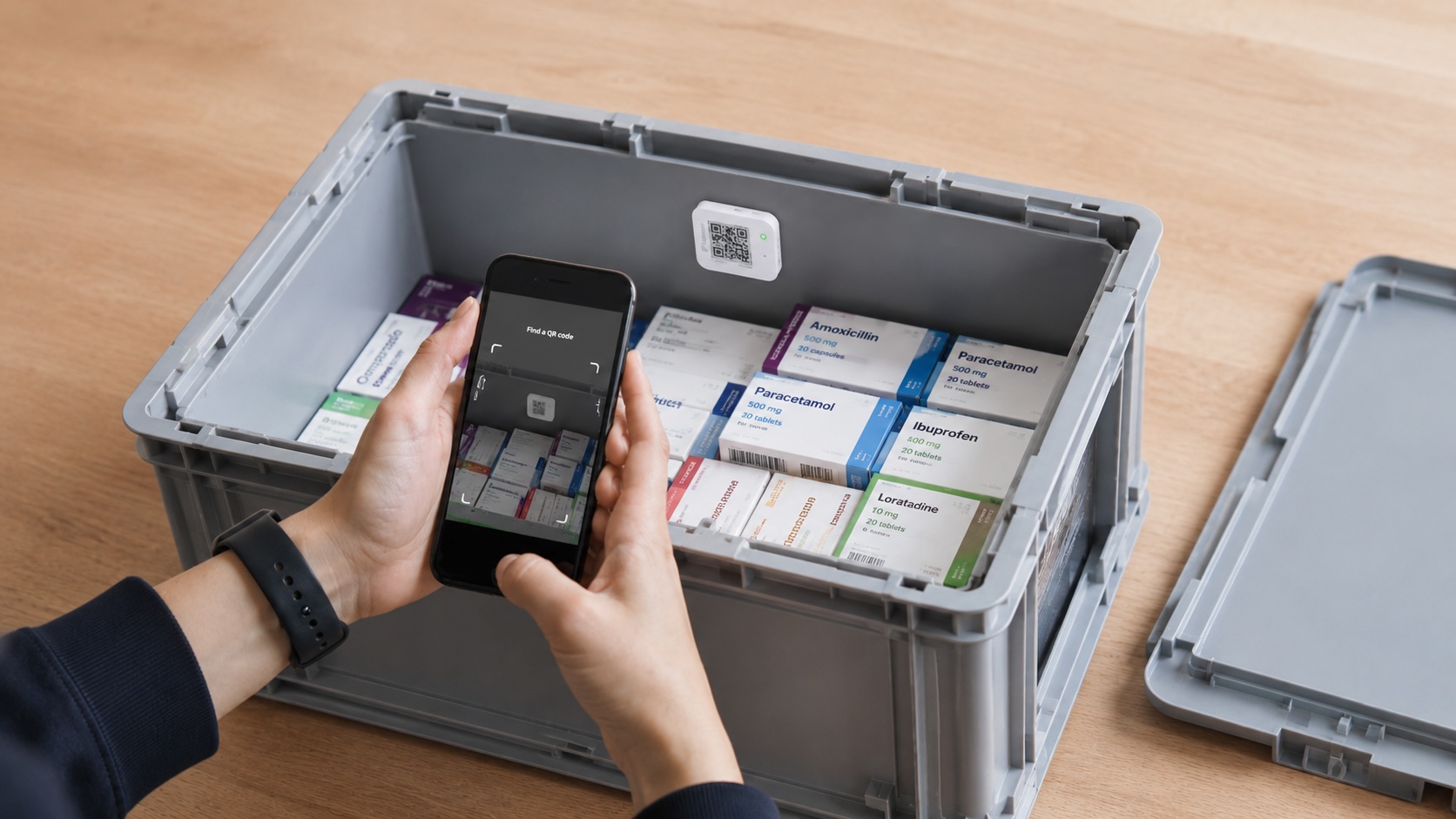
Shipment data uploads through a QR scan, reducing manual file handling at receiving sites and keeping evidence connected to the cloud record.
Temperature graphs, time outside limits, scan events, comments, certificates, and exports help quality teams evaluate shipment condition.
Audit trails, permissions, calibration certificates, validation materials, and secure records support regulated pharma quality processes.
Recommended setup
The right setup depends on product risk, return logistics, sensor needs, and the evidence your team needs after the shipment arrives.
Build the workflow around mission metadata, temperature reports, scan events, certificates, audit trails, and controlled exports.
Use QR scans when manufacturers, wholesalers, 3PLs, carriers, pharmacies, hospitals, or receivers need a simple shared process.
Define who reviews excursions, which report fields matter, how comments are captured, and how final decisions are documented.
GDP workflow
GDP-oriented monitoring needs clear responsibilities, documented excursions, and shared evidence for partners.
Frame the workflow around distribution conditions, temperature excursions, responsible review, documentation, and corrective action.
Cloud reports help QA, logistics, carriers, wholesalers, and partners discuss one shipment record instead of separate files.
Use thresholds, time outside limits, scan events, comments, certificates, and exports to support the customer's deviation process.
Scenarios and evidence
Use scan-to-cloud reports to reduce email chains and local file handling between commercial partners.
Use a receiver-friendly upload flow when many sites need to send evidence back without specialized equipment.
Use reports and exports when temperature events need to be discussed with transport partners.
Workflow
Keep the monitoring process clear enough for warehouses, receivers, QA teams, and partners to repeat.
Set logger type, measurement interval, thresholds, product profile, and reporting rules before dispatch.
The QR data logger records condition history while the shipment moves through carriers, handoffs, dwell time, and receiving.
A normal phone scan uploads data to Logmore Cloud without USB readers, installed receiver apps, or local report files.
Quality and logistics teams review reports, alerts, audit trails, certificates, comments, and exports from one cloud record.
Common objections
No. Logmore supports GDP workflows, but compliance depends on the customer's quality system, procedures, training, and validation.
No. Many GDP shipment workflows use logger evidence at handoff or receiving when the risk assessment allows after-the-fact review.
Product context
Industry overview for regulated pharma, life science, vaccine, sample, and clinical trial shipments.
Open pageExample of reducing manual QA work with automated temperature analysis.
Open pageExample of QR-based shipment status checks for pharmaceutical distribution.
Open pageLogger models for temperature, humidity, shock, light, and dry ice lanes.
Open pageCloud reports, dashboards, alerts, audit trails, certificates, comments, and exports.
Open pageConnect mission data to quality, logistics, WMS, TMS, and control-tower systems.
Open pageFAQ
It means monitoring and documenting distribution temperatures in a way that supports Good Distribution Practice expectations for pharmaceutical products.
No single tool makes a company compliant by itself. Logmore supports GDP workflows with monitoring records, reports, audit trails, and documentation that can fit into a customer's quality system.
Useful evidence includes temperature graphs, excursion details, logger identity, calibration certificates, scan events, timestamps, user actions, and controlled exports.
Not always. Many lanes can use logger-based evidence when the process, risk level, and quality requirements allow review at receiving or handoff points.
That depends on the customer's quality system, but reviews commonly involve QA, logistics, and carrier or partner teams.
Yes. Reports and exports can provide a shared evidence base for distribution partner performance discussions.
Related pages
Review how QR loggers, cloud reports, audit trails, certificates, and exports can support your distribution quality process.